
While they’re not usually as focused as business users — whose approach is rather more “It’s my job to do task A, then task B by the end of the day” — consumers’ computing behaviors tend to fall into the following broad categories:
- Consumption. This usually means the consumption of linear media: watching videos/movies, listening to music, reading books, general web surfing. In general, the three key criteria for a consumption device are an adequate display, good audio (mainly for music), and an easy-to-use user interface (UI).
- Communication. Fairly self-explanatory, this involves anything related to making a connection with another person or people — one-to-one or one-to-many. This includes traditional applications like email, voice calls, and messaging, as well as some of the newer tools like social networks and Twitter. Again, the device needs to be as easy to use as possible — preferably blending into the background – and always having it with you is a plus too.
- Interactive entertainment. By this, I mean gaming — a reliable usage scenario for most devices, ranging from humble smartphone games to sophisticated home consoles. This is pretty much the only usage scenario where software (i.e., the games) generates significant direct revenues from end users. The more powerful the device, the better it can present games – though this can be negated by compelling gameplay.
- Transactions. Here, eCommerce and online banking are the most widely used applications. Generally, while these tasks are not much fun, they need to be done and can usually be done much more efficiently online. Robust connectivity is needed here, along with compatibility with the (secure) application being used.
- Work-related activities. A minority of consumers also use their own devices for work or to support study. Compatibility becomes key; whatever device they want to use must be compatible with an employer’s system or school/college systems.
- Life stuff. This is something of a cross between work activities and pure transactions. Think of this as achieving those little daily tasks, such as creating posters for charity sales, keeping a family calendar updated, or coordinating holiday arrangements. The ability to print is often important here, as is giving multiple people the ability to access and edit these tasks.
- Creation. Held up (rightly) as the pinnacle of consumer usage, this ranges from simple tasks like assembling a photo album to writing a blog or book and even to music or video production. Creation may involve specialist software, and often has an engaged online community to get involved with for support and advice.
Another axis can be applied to all of the above: How often do you perform these tasks? Daily, weekly, once a year? For instance, if you only need to create and print a note once a year, you wouldn’t pick a device based on that as a core need.
When many of these tasks, regardless of the category, required local software and storage, consumers would opt for a PC. However, the emergence of single-function devices (e.g., DVRs, eReaders) that excel at just one thing offer real alternatives as do smartphones and tablets, particularly for content consumption and communication — two of the most popular consumer activities.
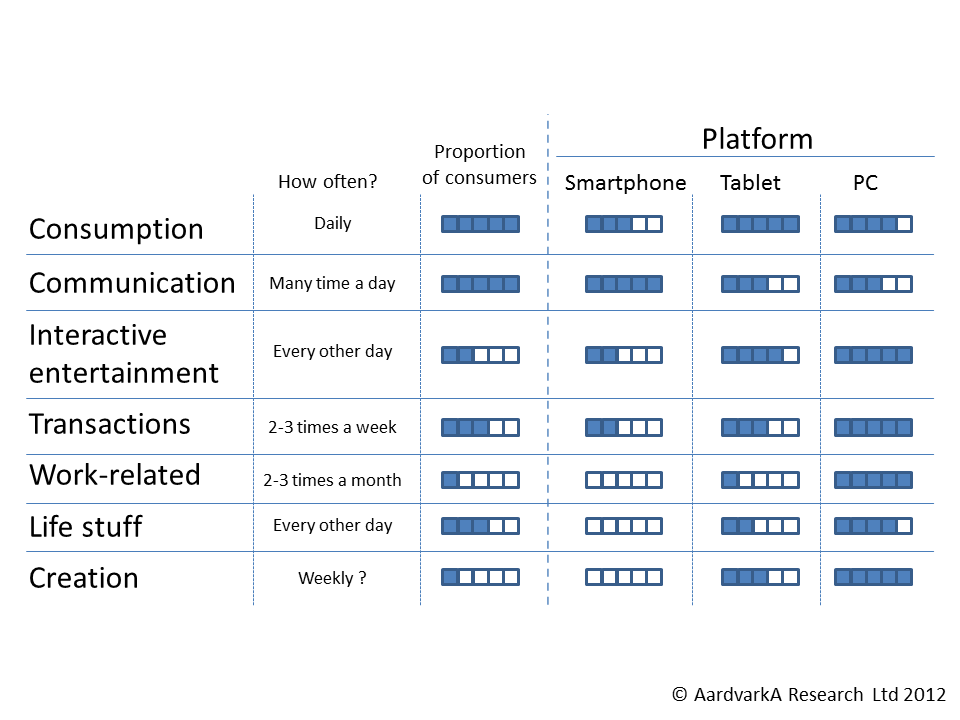
The above table takes a crack at rating general-purpose device options by usage scenario. The PC still has the edge overall, but notice that other devices edge it out in some of the more popular scenarios.
So, given this multitude of consumer motivations and scenarios, where does the industry go from here? I’ll make my predictions in the final post in this series.
 Aardvarka Research